
The Anatomy of Array
Why the Array changed the way we think about memory - And How can we master it
The Problem That Demanded a Solution
In the early days of computing, memory was a flat, featureless dessert. A machine had thousands of storage cells, each holding a number, each reachable only by its raw address- cell #1038, cell #1097, and so on. Programmers spoke to the machine in the language of addresses.
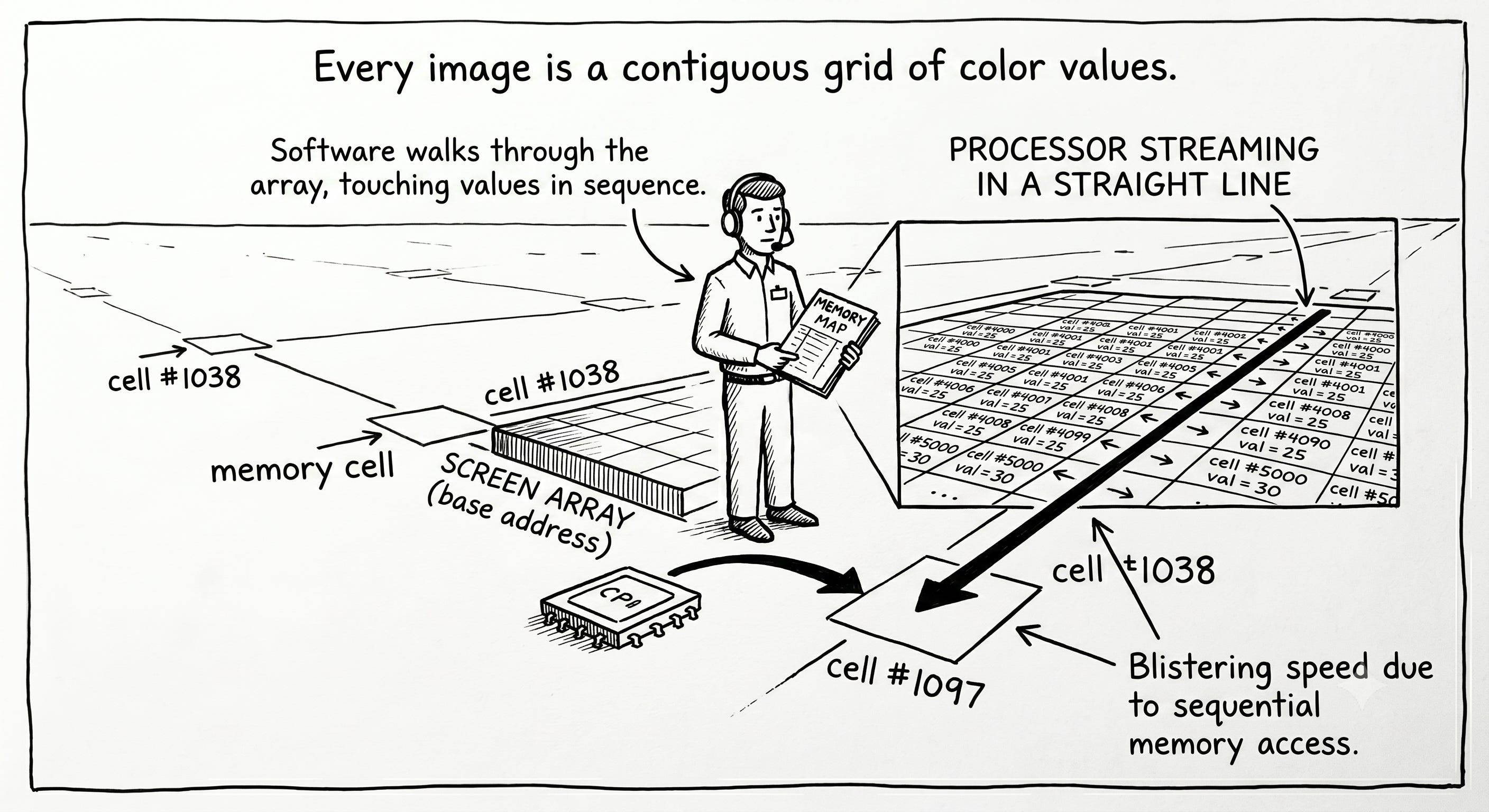
Then a question arose that sounds trivial today but was profound then: how do you store a list of one thousand related numbers and the find the 500th one instantly?
You could write down where each number lived in a notebook- number 1 is at address 1038, number 2 is at address 2034, number 3 is at 1077- and look it up every time. But that notebook would be as large as the data itself, and searching it brings you right back to where you started.
The breakthrough was almost insultingly simple: what if you didn’t scatter the numbers at all? What if you laid them down side by side, back to back, in one unbroken stretch of memory? Then you wouldn’t need a notebook. To find the 500th number, you’d just compute where it must be. No search. No lookup table. Pure arithmetic.
The idea - contiguous storage- is the array. It is the oldest data structure in computing, and nearly every other structure you will ever learn is built on top of it or defined in contrast to it.
Think about it: If you were handed a long, empty shelf and a thousand books to store, and you needed to grab book #743 in a single motion without scanning the shelf — how would you arrange them? What rule would let you walk directly to the right spot? Hold that thought. You’re about to derive the array from scratch.
How Arrays are used today
Arrays are so fundamental that they hide in plain sight inside almost everything you touch.
Your screen is an array. Every image is a grid of pixels stored as a contiguous block of color values. When you brighten a photo, software walks through that array, touching millions of values in sequence. The reason image editing feels instant is that arrays let the processor stream through memory in a straight line - the single fastest thing a computer can do.
Spreadsheets and scientific computing run on arrays. NumPy, the library underneath nearly all of Python’s data science and machine learning, is essentially a very fast, very clever array. When a neural network multiplies two matrices, it is multiplying two arrays, and the contiguous layout is why it can exploit the hardware’s full speed.
Databases buffer rows in arrays. When a database loads a page of records into memory, it places them contiguously so it can scan them at the speed of the memory bus rather than chasing pointers all over RAM.
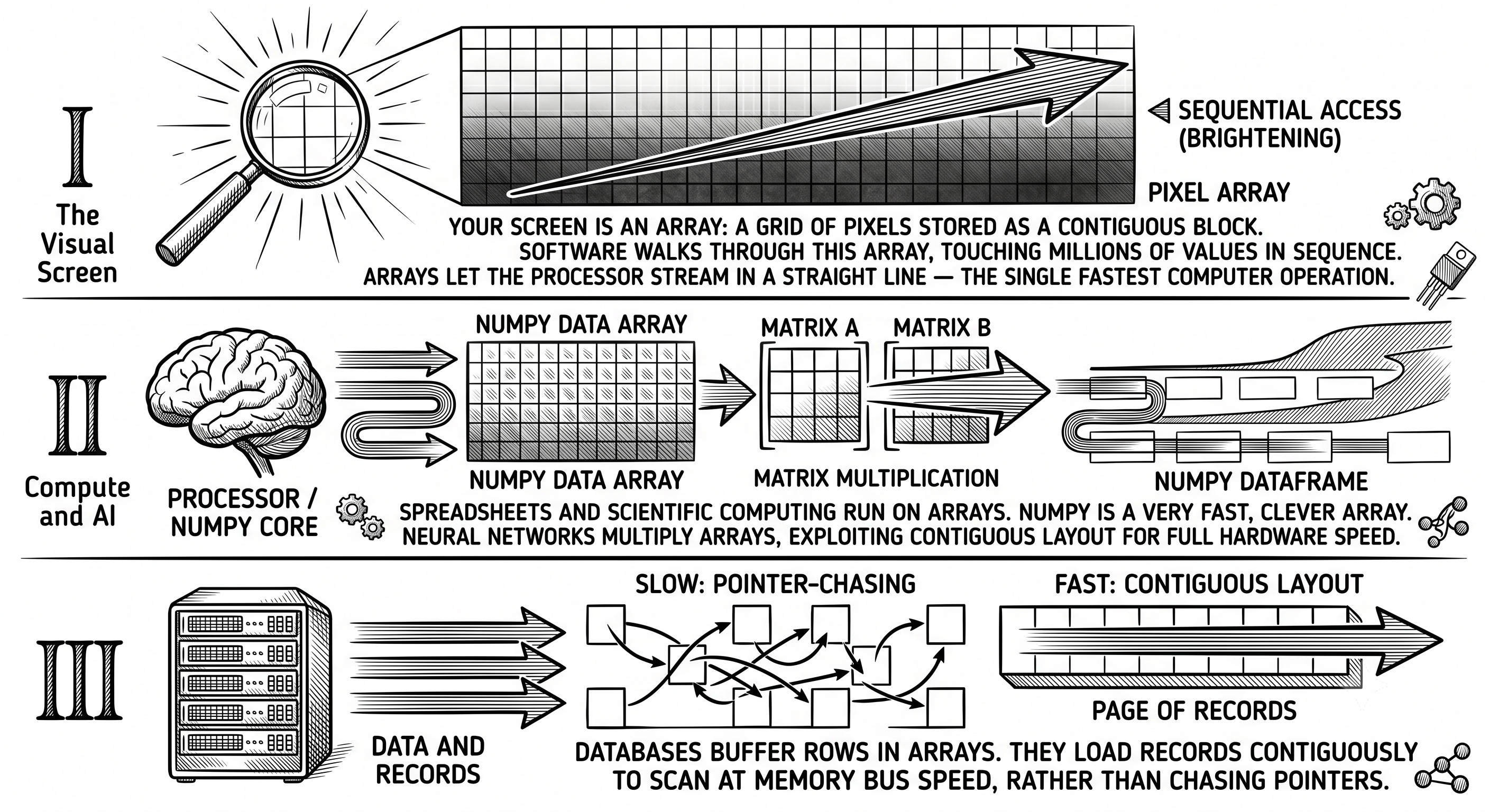
Think about it: Open the photo app on your phone and apply a filter. Behind that one tap, the device touched every pixel — often tens of millions of them — in a fraction of a second. If those pixels were scattered randomly across memory instead of laid out in a contiguous array, the same filter could take ten to a hundred times longer. Why would scattering them hurt so much? We’ll answer this precisely in section 4.
The Aha! Moment
If you know where the first element lives, and you know how big each element is, you never have to search for any element- you can calculate its address.
Let that land. Suppose your array of integers begins at memory address 1000, and each integer occupies 4 bytes. Where is element number “i”?
address(i) = base_address + (i × element_size)
So element 0 is at 1000, element 1 is at 1004, element 2 is at 1008. To find element 500, you don't walk past the other 499. You compute 1000 + 500 × 4 = 3000 and go straight there. One multiplication, one addition. It costs the same whether the array holds ten elements or ten billion.
This is why array access is called O(1) — constant time. The size of the array is irrelevant to the cost of reaching any single element.
The analogy: An array is a street of identical houses with consecutive numbers. If you know the street starts at house 1000 and every house is one lot wide, you don’t drive down the street reading mailboxes to find house 1500 — you know exactly how far down it is and you drive straight there. A linked list (which you’ll meet later) is the opposite: a scavenger hunt where each house only tells you the address of the next house, so finding house 1500 means visiting 1499 houses first.
Think about it: This O(1) magic depends on one rigid requirement — every element must be the same size. Why is that non-negotiable? What would break in the address formula above if element 3 were suddenly twice as big as the others? (This single constraint explains an enormous amount about how arrays behave — and why strings and objects need special handling.)
How it works under the Hood
Memory is a line, and the array embraces it
Physical memory (RAM) is, at the hardware level, one enormous numbered sequence of bytes. An array maps onto this perfectly: it asks the system for one continuous block and lays its elements down in order.
Here is what an array of five integers actually looks like in memory, starting at address 1000:
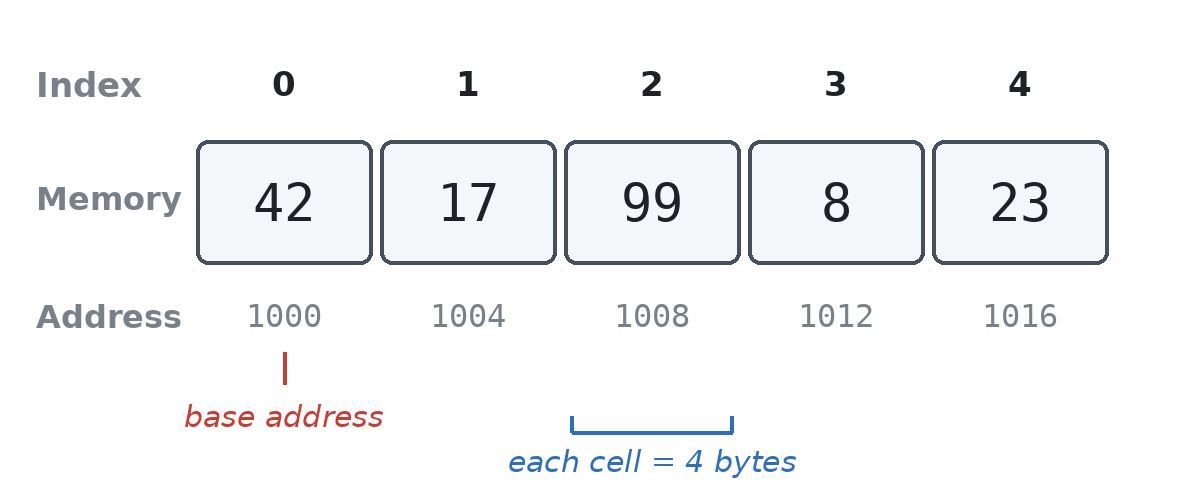
To read index 3: 1000 + 3 × 4 = 1012. The value 8 is fetched directly.
Remember why scattering pixels would be slow? It’s because of the CPU cache. When the processor fetches a value from RAM, it doesn’t grab just that one value — it grabs a whole neighboring chunk (a “cache line,” typically 64 bytes) and stores it in ultra-fast memory right next to the CPU, betting that you’ll want the neighbors next.
With an array, that bet always wins. Element 0 and element 1 sit right next to each other, so fetching one pulls in the others for free. Walking an array is like reading a book left to right. Walking a scattered structure is like flipping to a random page for every word — the CPU keeps having to go all the way back to slow RAM. This is the single biggest reason arrays outperform other structures in practice, and it never shows up in a Big-O analysis.
Static vs. Dynamic arrays
There are two flavors, and the difference matters enormously.
A static array has a fixed size, decided when it’s created. In C, it can live on the stack- a fast, automatically managed region of memory.
// C — a static array of 5 integers, lives on the stack
int numbers[5] = {42, 17, 99, 8, 23};
int third = numbers[2];   // direct access: *(numbers + 2)
That numbers[2] is literally syntactic sugar. The compiler translates it into *(numbers + 2) - “go to the base address, step forward 2 elements, read there what’s there.” The brackets are a polite mask over raw pointer arithmetic.
But static array have a fatal limitation: you must know the size in advance, and you can never grow. What if you don’t know how many elements you’ll have?
The dynamic array: how lists actually work
This is the structure hiding inside Python’s list, Java’s ArrayList, C++’s std::vector, and Javascript’s Array. The trick is beautiful:
Allocate a block bigger than you currently need (extra capacity).
Track two numbers: size (how many elements you’re using) and capacity (how many you could hold).
When you run out of capacity, allocate a new bigger block (usually double the size), copy everything over, and free the old one.
Here is a minimal dynamic array in C, where you can see every gear turing:
// C - a dynamic array (the engine inside every "list")
#include <stdlib.h>

typedef struct {
  int *data;    // pointer to the contiguous block on the heap
  int size;     // how many elements are in use
  int capacity;  // how many we have room for
} DynamicArray;

DynamicArray* create() {
  DynamicArray *arr = malloc(sizeof(DynamicArray));
  arr->capacity = 2;
  arr->size = 0;
  arr->data = malloc(arr->capacity * sizeof(int));  // ask heap for a block
  return arr;
}

void push(DynamicArray *arr, int value) {
  if (arr->size == arr->capacity) {. // full? grow!
    arr->capacity *= 2;      // double the capacity
    arr->data = realloc(arr->data, arr->capacity * sizeof(int));
  }
  arr->data[arr->size] = value;  //place of new element
  arr->size++;
}
The same idea, expressed in Java’s object-oriented style:
// Java - the same engine, dressed in OOP
class DynamicArray {
  private int[] data;
  private int size;

  public DynamicArray() {
    data = new int[2]; //initial capacity
    size =0;
 }

  public void push(int value) {
    if(size == data.length){
      int[] bigger = new int[data.length * 2];
      System.arraycopy(data, 0, bigger, 0, size);  // copy everything
      data = bigger;
    }
    data[size++] = value;
  }
}
And in Python — where this machinery is invisible because the language is the dynamic array:
python
# Python — the dynamic array IS the built-in list
numbers = [42, 17, 99]
numbers.append(23)   # CPython does the doubling-and-copying for you,
                     # in C, under the hood. You never see it.
Every time you call .append() in Python or .add() in Java, this resize logic might fire. You just never see it.
Think about it: Watch this dynamic array grow as we push 5 elements, starting from capacity 2. Trace the capacity at each step:
push 1 → size 1, capacity 2
push 2 → size 2, capacity 2   (now full)
push 3 → FULL! double to 4, copy 2 old elements, then add → size 3, capacity 4
push 4 → size 4, capacity 4   (now full)
push 5 → FULL! double to 8, copy 4 old elements, then add → size 5, capacity 8
Notice the copies happen occasionally, not every time. Most pushes are instant; a few are expensive. So is
appendfast or slow? The answer is subtler than it looks — and it’s the key to the next section.
The Analysis: Time, Space, and Trade-offs
The Big-O cheat sheet
OperationStatic ArrayDynamic ArrayWhyAccess by indexO(1)O(1)Address arithmetic — no searchUpdate by indexO(1)O(1)Go straight there, overwriteSearch (unsorted)O(n)O(n)Must check each elementInsert/delete at end—O(1)**Amortized — see belowInsert/delete at frontO(n)O(n)Must shift every element overInsert/delete in middleO(n)O(n)Must shift elements after it
The “amortized O(1)” puzzle
That asterisk is the most important idea in this whole article. Appending to a dynamic array is usually O(1), but occasionally O(n) when a resize triggers a full copy. So what do we call it?
The answer is amortized O(1). Here’s the intuition: imagine those expensive copy operations as a cost you pre-pay across all the cheap operations. Because the array doubles each time, the expensive resizes get exponentially rarer as the array grows. If you push n elements, the total copying work across all resizes adds up to roughly n — not n². Spread that cost evenly across all n pushes, and each push “costs” a constant amount on average.
This is why doubling matters. If the array grew by adding just one slot each time, every single push would trigger a copy, and building an array of n elements would cost O(n²) — catastrophically slow. Doubling is what makes append cheap.
The space trade-off
A dynamic array pays for its flexibility with memory. Right after a resize, it might be holding n elements in a block sized for 2n — wasting up to half its space. This is the eternal bargain of arrays: you trade some memory for blistering access speed.
Think about it: You’re storing GPS coordinates streaming in from a sensor, and you have no idea how many you’ll get — could be 50, could be 50 million. Would you reach for a static array or a dynamic one? Now flip it: you’re representing a chessboard, always exactly 64 squares. Which structure now, and why does the answer flip?
When to Use (and Avoid) Arrays
Arrays are the right choice when:
You need fast, random access by position — “give me the 9000th element” — and you need it constantly.
You’re iterating through everything in order, where the cache-friendliness gives you near-hardware-speed throughput.
Your data is naturally indexed by number — pixels in an image, samples in audio, cells on a board, frames in a video.
Arrays are the wrong choice when:
You’re frequently inserting or deleting in the middle or at the front. Every such operation forces you to shift a cascade of elements over by one — O(n) every time. A linked list does this in O(1).
You need to look things up by a key rather than a position — “find the user named Alice.” That’s a hash map’s job, not an array’s.
Think about it: You’re building the “undo” feature for a text editor. Every keystroke needs to be recorded, and undo always removes the most recent one. Operations only ever happen at the end of the collection. Is an array a good fit here? Which end-only operations does it do in O(1), and does that match what undo needs? (You’re quietly discovering why a stack — coming up later in this series — is usually built on an array.)
Test Your Understanding
Problem 1 — Foundation. Without running any code, predict the output. An array starts as [10, 20, 30, 40, 50]. You delete the element at index 1 by shifting everything after it left, then decrementing size. What does the array’s used portion look like now, and how many elements had to move?
Problem 2 — Implementation. Extend the dynamic array from section 4 with a pop() operation that removes and returns the last element. Bonus: when the array becomes less than one-quarter full, shrink the capacity by half. Why one-quarter and not one-half? (Hint: think about what happens if you repeatedly push and pop right at the boundary.)
Problem 3 — Real-World. You’re building a music player’s “recently played” list that holds the last 20 songs. When a 21st song plays, the oldest should drop off. Design this using a fixed-size array that never resizes and never shifts elements. (Hint: what if the “start” of your list could move around the array, wrapping back to the beginning? You’re inventing the circular buffer — the structure behind the queues later in this series.)
Common Pitfalls and Pro Tips
Pitfalls that bite everyone:
Off-by-one errors. An array of size
nhas valid indices0throughn-1. Writing to indexnis one of the most common bugs in all of programming — and in C, it doesn’t even complain. It silently corrupts whatever memory sat next door.Assuming insertion is cheap. Beginners reach for
insert(0, x)(insert at front) casually, not realizing it shifts every element. Do it in a loop over a large array and you’ve written accidental O(n²) code.Forgetting that resizing copies. In a tight performance loop, repeatedly appending to a fresh dynamic array can trigger many resizes. If you know the final size ahead of time, pre-allocate it.
Pro tips from the trenches:
Pre-size when you can. Python’s list doesn’t expose this, but
[None] * npre-allocates. Java’snew ArrayList<>(expectedSize)and C++’svector.reserve(n)skip all the intermediate resizes. This is free performance.Iterate forward, not randomly. If you have a choice in how you traverse data, going in order respects the cache and can be many times faster than jumping around — even with identical Big-O.
Think about it: Your program builds a list of one million items by appending them one at a time, and it’s mysteriously slow. You haven’t pre-allocated. Roughly how many times did the underlying array resize and copy itself on the way to a million? (With doubling from a small start, it’s about 20 times — but those last few copies move hundreds of thousands of elements each. What’s the cheap one-line fix?)
Linking Arrays to other Concepts
The array’s strengths and weaknesses are a mirror image of the linked list, the next structure in this series. Where the array gives you instant access by index but pays dearly for front/middle insertions, the linked list does the exact reverse: O(1) insertions anywhere you’re already standing, but O(n) to find a position because there’s no address formula — you have to walk the chain. Neither is “better.” They’re tools shaped for opposite jobs.
Arrays are also the substrate for structures that seem unrelated. A stack is usually just an array where you only ever touch the end. A queue is often a circular buffer — an array whose start and end wrap around. Even a hash map stores its buckets in an array. Learn the array deeply and you’ve laid the foundation for half of everything that follows.
Think about it: A linked list never needs to resize or copy itself to grow — it just allocates one new node and links it in. That sounds strictly better than the array’s occasional expensive doubling. So why is appending to an array still usually faster in practice than appending to a linked list? (The answer isn’t in the Big-O — it’s in section 4. Think about what the CPU cache does with contiguous memory versus scattered nodes.)
One Sentence to Remember Forever
An array trades flexibility for raw speed: by demanding that its elements sit shoulder to shoulder in memory, all the same size, it earns the power to reach any one of them instantly — with arithmetic instead of searching.
Everything else about arrays — the O(1) access, the cache-friendliness, the painful insertions, the doubling dance of dynamic arrays — falls out of that one bargain.
Think about it: Explain an array to someone who has never programmed, using only the image of a street of numbered houses. Can you make them understand why finding house #500 is instant, but inserting a new house between #3 and #4 means renumbering the entire street? If you can explain that, you understand arrays better than most working programmers.
Your Challenge this week
Implement a dynamic array from scratch in whichever of the three languages you’re least comfortable with. If you live in Python, write it in C and feel the
mallocandrealloc. If you live in C, write it in Python and notice how much the language hides. The discomfort is where the learning happens.